

Skip to content
Getting started

For companies new to Zendesk.


Improve & optimise

For organisations already using Zendesk.


Build & Extend

Modular add-ons and enhancements.


CX & EX knowledge hub

20201126_Kurt-Premium Plus_0099-bewerkt

Practical guides, frameworks, and tools to improve customer and employee experience.

Blog & insights

20201126_Kurt-Premium Plus_0293-bewerkt

Expert perspectives on CX, EX and Zendesk based on real projects and experience.

Events & webinars

padelPPLUS-152

Live sessions and webinars where our experts share insights, use cases, and best practices.

Your P+ self-service portal for Zendesk and Premium Plus

The self service portal gives you a clear overview of your Zendesk subscriptions and Premium Plus services. Manage licences, track services, access documentation, and collaborate with Premium Plus in one central place.

Available for free to all Premium Plus customers
 
PremiumPlus-meeting day-431

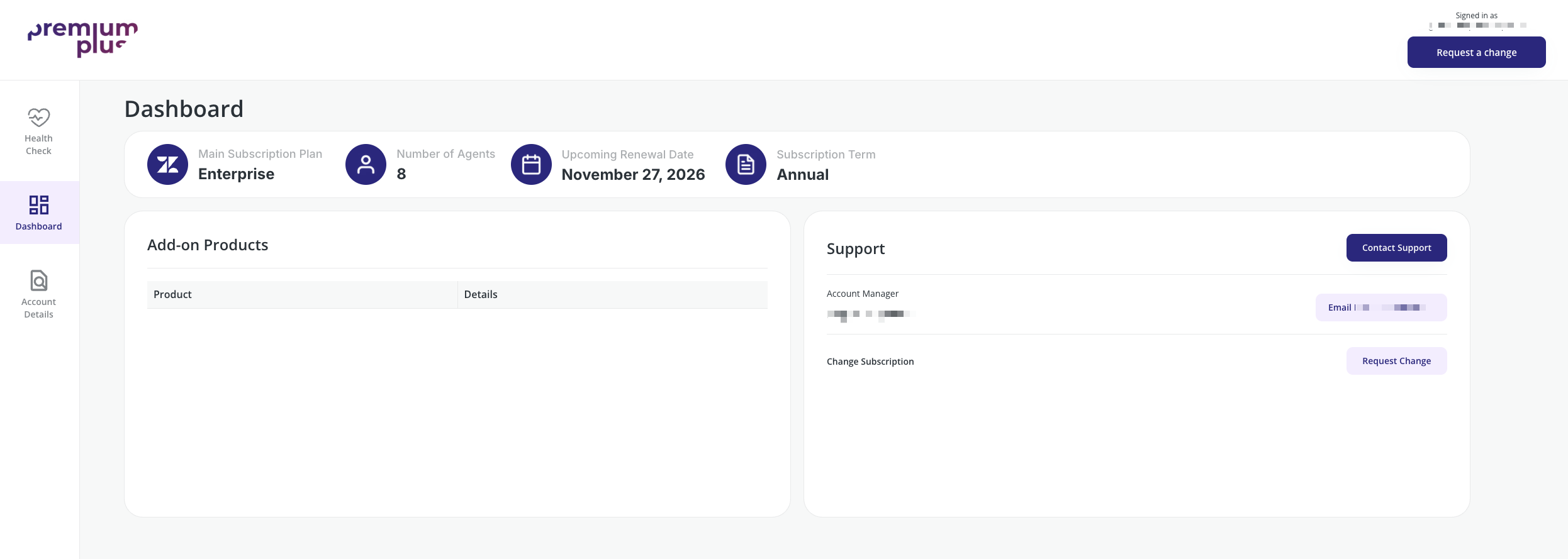
One place to manage subscriptions and services

The self service portal is designed for managing your Zendesk setup and your collaboration with Premium Plus. It does not replace Zendesk tickets or daily support workflows.

Instead, it provides structure around subscriptions, services, agreements, and requests, so all stakeholders have the same information and context.

20201126_Kurt-Premium Plus_0125-bewerkt-1

A management layer around Zendesk

Zendesk remains the operational platform where service teams work with tickets, channels and customers.

The portal sits on top of that.
It supports the management, coordination and decision-making layer around Zendesk.

This includes visibility into subscriptions, services and collaboration with Premium Plus, without interfering with daily support operations.

screenshot-1

What customers can do with the portal


Manage Zendesk subscriptions and licenses

Customers get a clear overview of their Zendesk plans, licenses and changes over time. This removes uncertainty and avoids dependency on email threads or manual tracking.

Track Premium Plus services and engagements

The portal shows which services are active, planned or completed, such as optimisation, training, Premium Care or consultancy work. This creates alignment across teams and stakeholders.

Centralise documentation and agreements

Contracts, service agreements and relevant documents are available in one shared location. Everyone works from the same information, at the same time.

Request changes with context

License or service requests can be submitted directly through the portal, with full background and scope. This reduces miscommunication and speeds up follow-up.

Create transparency and shared ownership

By giving all stakeholders access to the same overview, the portal reduces friction and creates a more transparent way of working between customers and Premium Plus.


Built for collaboration, not ticket handling

The Premium Plus portal is not a support desk and not a replacement for Zendesk tickets.

It is designed to support collaboration, planning and decision-making.
Zendesk handles the customer conversations.
The portal handles the partnership.

That separation keeps both environments clean and focused.

Part of working with Premium Plus

Access to the Premium Plus portal is included for Premium Plus customers. It is not sold as a standalone product, but offered as part of how we work.

For organisations considering Premium Plus, the portal often becomes a tangible example of what a structured, transparent partnership looks like in practice.



Who is the portal app for

The portal gives Zendesk owners a clear overview of licenses, services and changes, so they can manage Zendesk with confidence and less manual coordination.

Multi-stakeholder teams

When multiple roles are involved in Zendesk decisions, the portal creates one shared source of truth that keeps everyone aligned and informed.

Procurement & contract stakeholders

For procurement teams, the portal provides transparency around subscriptions, agreements and changes, making governance and renewals easier to manage.

CX & EX managers

CX and EX leaders use the portal to stay aligned on ongoing services, priorities and next steps, without relying on fragmented updates or assumptions.

Zendesk owners & administrators

The portal gives Zendesk owners a clear overview of licenses, services and changes, so they can manage Zendesk with confidence and less manual coordination.
INSTALL THE APP

Available via the Zendesk Marketplace for Premium Plus customers.

Award 8