


Last Updated - March 24th
See last updates
Zendesk recently announced a change that affects how anonymous users submit requests through the Help Centre. The update aims to reduce spam and improve the reliability of incoming support tickets.
The rollout is scheduled to begin 9 March 2026. Below is a summary of what’s changing and what teams should review in their Zendesk setup.
What’s changing
Zendesk will introduce email verification for anonymous Help Centre requests.
When a user submits a request without being signed in, Zendesk will send a verification email to confirm ownership of the email address. The ticket will only become active after the email is verified.
Here’s how the workflow will look:
- A user submits a request through the Help Centre form.
- Zendesk sends a verification email to the address provided.
- The request is created as a suspended ticket.
- The ticket becomes active once:
- the user clicks the verification link, or
- an agent manually recovers the ticket from the Suspended Tickets view.
Suspended tickets remain available so agents can review and recover legitimate requests when needed.
Where this applies
This verification step applies to anonymous requests created through:
- Help Centre web forms
- /api/v2/requests API endpoint
- Web Widget (Classic) offline forms
- Support SDK
It does not apply to:
- Requests submitted by signed-in users
- Tickets created by agents
- Requests sent by email
Tickets created through messaging channels
Why Zendesk is introducing this change
Spam attacks targeting open support forms have become more frequent across SaaS platforms. Anonymous request forms can be exploited to generate large volumes of automated tickets.
By verifying the requester’s email address, Zendesk adds a layer of protection that helps:
- confirm that the requester owns the email address provided
- reduce automated or abusive ticket submissions
- keep spam out of active ticket queues
- protect agent time and productivity
This approach is increasingly common as many platforms move away from fully open ticket submission models.
What teams should review
The feature will be enabled automatically, but it’s worth reviewing a few areas in your Zendesk setup.
Inform your support team
Agents should be aware that anonymous requests may initially appear as suspended tickets until verified.
Make sure your team knows how to review and recover legitimate requests from the Suspended Tickets view.
Review your suspended ticket workflow
Many Zendesk instances already use suspended tickets to manage spam.
Now is a good moment to review:
- how often suspended tickets are checked
- who is responsible for reviewing them
- whether notifications for suspended tickets are enabled
Update Help Centre instructions
If your Help Centre includes articles explaining how to contact support, consider adding a short note explaining that users may need to verify their email address after submitting a request.
This helps avoid confusion for first-time users.
More details on the Rollout for the Pods below :
-
March 24, 2026, 10am PST: Pods 13, 15, 17, 18, 19, 31
- March 31, 2026, 10am PST: Pods 20, 23, 25, 27, 28, 29, 30
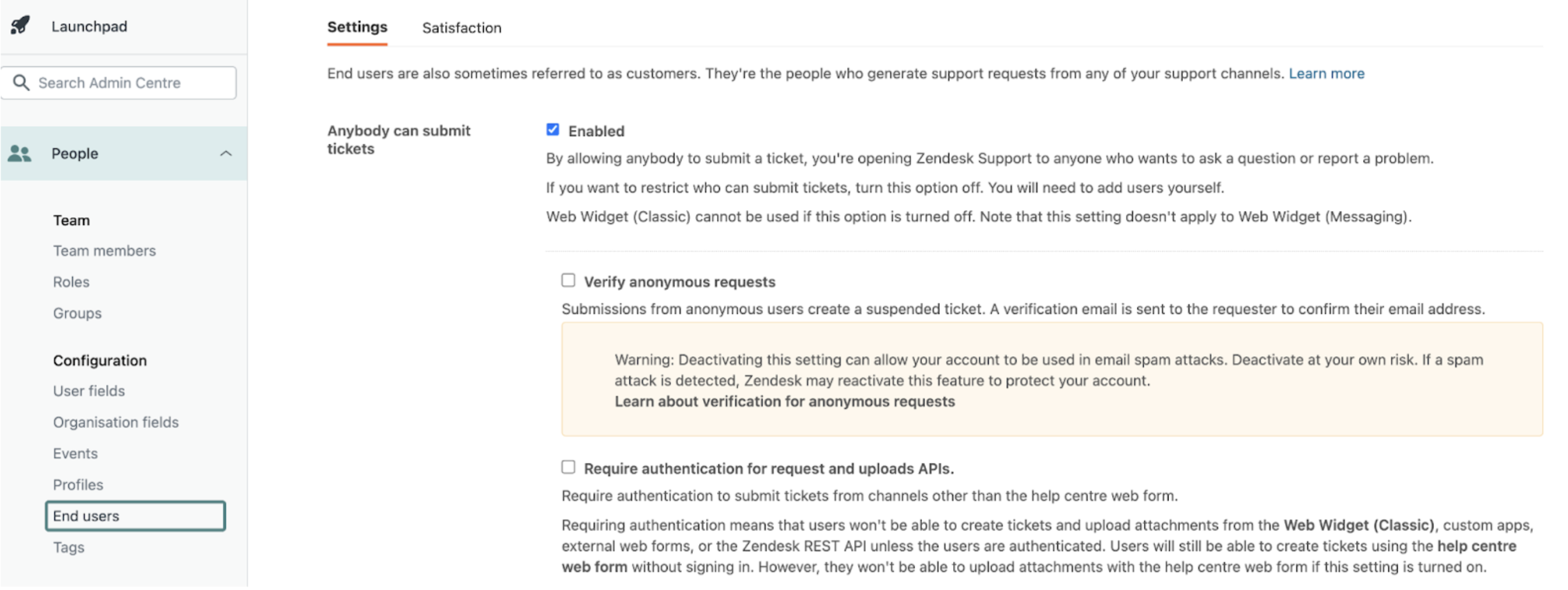
Zendesk launched on Mar 19th a feature to opt out for the end-user verification, Zendesk did not detail the process, but we can show client how to do it :
-
Go to Admin -> People -> End Users
-
In the Settings tab, untick the “Verify anonymous requests” (at the top of the page, see screenshot below.
-
Hit Save at the bottom of the page
Be careful, you need to deactivate this feature prior to the rollout, if not your account will be equipped with this security option by default. But you will be able to turn it off by following these steps described above.
A good moment to review your support entry points
This change also highlights a broader shift in customer support platforms: fully open ticket forms are becoming less common due to security risks.
Many organisations are moving towards:
- Signed-in support experiences
- Single Sign-On (SSO)
- Messaging channels
- AI agents and automated assistance
These approaches reduce spam, provide more context about the customer, and enable more personalised support.
Need help reviewing your Zendesk setup?
If you’d like help reviewing your Help Centre configuration, suspended ticket workflows, or authentication setup, our team can support you.
Premium Plus works with organisations across EMEA to optimise Zendesk environments, improve support workflows, and strengthen customer experience.
Feel free to get in touch with us if you’d like to discuss your setup.